Featured Post -

News 1
News 2
News 3
News 4


Showing posts with label Windows. Show all posts

The Future Of Microsoft Is Sunny With A Chance Of Thunderstorms

Thursday, June 21, 2012 0 comments

The past few years haven’t been kind to Microsoft. (There’s no need to walk down memory lane. We all know what’s happened.) But somehow that’s all changed in the past few days. Surface andWindows Phone 8, along with Windows 8 andXbox prove there’s still some fight left in the old dog. It’s a bit premature to say that the company is back and that the decades long string of mediocrity coming out of Redmond is over but the company is clearly focused and we haven’t seenthat Microsoft in a long, long time.
The shroud of mystery surrounding the Surface announcement earlier this week in LA had the press in a tizzy. We’d all been burned one too many times and the thought of something lame being announced loomed large. It is Microsoft, after all. What they managed to pull off was nothing short of spectacular, though. Microsoft employees were kept in the dark with most finding out at the same time as press. This wasn’t a case where employees were being sheepish with details either. Most simply had no idea.
Rumors surrounding the event swirled with some being sort of right and some being flat out wrong. The reason Surface was kept under wraps so tightly has a lot to do with the company’s horizontal product line. A vertically integrated one can lead to leaks due to the number of folks involved. There’s a reason Tim Cook said at D10 that Apple would be doubling down on security. Loose lips sink ships.
Like any Microsoft announcement though, the detractors came out in full force during and after the Surface announcement. Why have a Pro model? Why not announce pricing and availability? Why not let anyone try the Touch Cover? Couldn’t agree more.
Others, however, decided to scold Microsoft for “screwing” their hardware partners. First of all, Microsoft isn’t screwing the OEMs, they’re simply challenging them to do better. Fact is, both sides have been screwing each other for decades. Microsoft is simply setting the bar and the manufacturers need to put up or shut up so long as Microsoft delivers the software. And that’s still a big if. But the OEMs only have themselves to blame. A sentiment felt by others.
Analysts quoted in a Reuters report were quick to shoot down Surface saying Microsoft needed to undercut Apple’s iPad to be competitive.
“Analysts expect the slimmer Windows 8 tablet to struggle to compete with the iPad, which offers over 225,000 apps, and to a lesser extent with Google Inc’s Android-based tablets, such as the Samsung’s Galaxy Tab.”
Maybe Reuters just doesn’t know what they’re talking about? At best, this is pretty laughable. For starters, the product isn’t finished and hasn’t shipped. And to be honest, the whole app argument doesn’t apply here. The two use-case scenarios are completely different. The Surface may be similar in form to the iPad but it’s geared towards productivity and real multi-tasking. Why do you think they slammed a keyboard into the cover? Yes, Windows 8 and the entire Windows eco-system lack the sheer volume of apps found in iOS and Android but what more do you need than email, a web browser and Office on a device like the Surface?
Whereas the iPad is clearly being used to consume content, not creating it. As hard as Apple has tried at every iPad unveil to convince developers that the hardware can drive amazing software like Garage Band, iPhoto and Pages/Numbers/Keynote, the iPad remains an entertainment focused device. When you’re making billions of dollars off other people’s work why fight the power? Just bask in its glory and reap the rewards, I say.

I enjoyed the teaser video for Surface as much as the next guy/gal but that screamed Droid/Verizon marketing. Verizon killed it with that campaign. There’s a reason why most people assume that any Android device is simply called Droid. Whoever was in charge of that video and marketing as a whole going forward for Surface really needs to think of something distinctive and unique to the Surface brand.
The excitement drummed up on Monday trickled over to today’s public acknowledgement and developer preview of Windows Phone 8. Microsoft says Channel 9 saw more views today than past events. (To be honest, they haven’t had that much exciting news to share anyway.) Some might call that positive momentum.
Windows Phone 8 signals a massive momentum shift for the unification of Windows as a whole. A shared kernel with Windows adds enough incentive for developers to build for both without even thinking about it. But this group still has an uphill battle ahead of them. To date there hasn’t been a single “hero” or flagship device for the platform. Everywhere you look across the lineup you see a blank slate of black slabs. Aside from the Lumia 900, every other device in the lineup looks like every other device in the Android lineup.
Today Microsoft revealed the roadmap for current Windows Phone device owners to upgrade to a neutered version of the next OS, Windows Phone 7.8. It didn’t have to be that way, though. By all accounts, what we were shown today is a small portion of what Windows Phone 8 is. By announcing that 7/7.5 devices might only see a new Start Screen could be equated to suicide. Why would a potential buyer go and buy a device now knowing the next crop of devices in the fall will carry an updated and arguably better OS that will likely be future proof? Way to alienate your current customers and possibly push them towards another platform this coming fall.
They should have kept mum on the whole thing or declared that every software feature in WP8 would be applicable to existing devices. At least offer developers Native Code support. Wallet is compelling enough that you don’t really need NFC to reap the benefits of what it has to offer. Announcing that the Start Screen might be the only thing that ports over was fucking stupid. Classic Microsoft. Classic.
Still, there’s hope. Microsoft has yet to finalize Windows Phone 8 and what 7.8 could be. If enough developers jump on board and create some killer speech recognition apps like this, then Siri definitely has some competition. You also have hardware partners like Nokia building out and updating apps for current Lumia owners. Future WP8 Nokia devices will also ship with Nokia Maps, which is arguably some of the best turn-by-turn navigation software available and it’s free!
Where the Finnish handset maker fell short with the Lumia 900 was the camera. AT&T and even Nokia marketing touted the Carl Zeiss lens and folks at both Microsoft and Nokia will tell you (maybe not you but I’ve heard it from both sides) how disappointing it’s been. Nokia, however, has proven thatPureView as a technology is more than capable of capturing some amazing images. You won’t see a 41-megapixel camera in the next WP8 device from Nokia but you will see the core technology coupled with Scalado (Nokia is in the process of acquiring the team and IP) in an upcoming device. HTC is also doubling down on camera enhancements so competition will hopefully drive even further innovation. I standby my previous statement that Samsung will only dabble.
What Microsoft showcased today and earlier this week proves the company has finally come to its senses. It also highlights how vulnerable they’ve made themselves by setting such high expectations. Can they deliver? We’ll see but for now I’m excited to see how the rest of this year plays out.

Windows Phone 8 Is A Great Big, Crazy, Beautiful Mess

0 comments


The Lumia 900 sold me on Windows Phone. The 900 is a marriage of fresh hardware with a fun operating system. I dig the Start Screen with the Live Tiles. There are some shortcomings. The camera sucks, to be sure, and the phone isn’t yet available on Verizon. Plus, after using the phone for several weeks, it was clear that the phone’s large screen is wasted on Windows Phone 7.5. It’s more of the same concerning the 900′s HTC cousin, the Titan II. Microsoft clearly agrees.
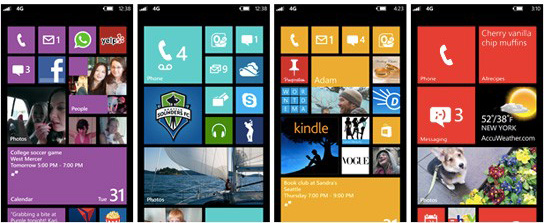
Full disclaimer: I haven’t touched a Windows Phone 8 device yet. That said, it’s hard to look at the several dozen screen shots and demo videos from today’s event and not be excited about the future of Windows Phone 8. Yes, it’s a busy interface. But my oh my the new Start Screen is – if I may – a clusterfuck of goodness.
Windows had some cojones releasing Windows 7 some 18 months ago. It was totally different. It lacked key features. It had poor hardware and carrier support. But clearly ignoring analysts, pundits and ignorant bloggers, Redmond kept at it, steadily releasing updates that solve current issues while introducing new features.
The current release, Windows 7.5, is a solid mobile platform worthy of serious consideration. Admittedly, it’s not necessarily better than Android or iOS, but rather different in key ways that make it special. And now with Windows Phone 8, and in the interim, Windows Phone 7.8, the core system might actually be better than its competitors.
The new Start Screen that will debut on some current devices with Windows Phone 7.8. The Live Tiles are now customizable, allowing owners to completely reshape their Start Screen in a grid of application shortcuts. What’s more, an upcoming SDK will allow app developers to utilize this ability and craft their respective Live Tile for different sizes and functions.
This evolution matches the industry’s trend of supersized phone screens. Why have a relatively standard grid of Live Tiles when there is so much screen real estate on new phones? Short answer: With Windows Phone 7.8 and 8, you don’t have to!
Microsoft is allowing phone owners to totally customize their phone in ways not possible with iOS and Android. All iPhones look the same but no Windows Phone 8 device will look like any other. For better or worse, this organized chaos is a result of a philosophy that has always centered around users getting tasks down quickly. The New Start Screen is just the next step towards this goal – and it’s totally fresh.
Microsoft pulled out all the stops on today’s Windows Phone 8 event. Plus, this was just a preview of the Windows Phone 8 and 7.8. More info will come later. It was a media bonanza complete with pre-briefings and the like. Microsoft is clearly proud of its new baby and wanted to show it off — just like it did two days back with the Surface unveiling. It’s also clear that Microsoft has found a new swagger. Microsoft might be back.


Microsoft Launches Windows 8 Release Preview

Thursday, May 31, 2012 0 comments


Microsoft just announced that the Windows 8 Release Preview, the company’s final pre-release version of Windows 8, is now available for download. With this release, Microsoft is also making new versions of its Windows 8 apps for Hotmail, SkyDrive an Messenger available, as well as hundreds of new and updated apps from third-party developers in the Windows Store.
Other new apps in this release include a Bing Travel app, as well as Gaming and Music Xbox apps that integrate with Microsoft’s Zune music service.
Microsoft says that it will focus its resources before launching the final version of Windows 8 on improving the installation process, security and privacy, as well as device and software compatibility. As Microsoft’s president of its Windows Division Steven Sinofsky noted, his team “will still be changing Windows 8, as we have done in past releases of Windows.”
We will be giving the Release Preview a good spin soon, but we already know that Microsoft hassignificantly improved multi-monitor support in Windows 8, for example. While this new version still features the Windows 8 Aero theme, we also know that this will be gone in the final release.
Microsoft also says that it has increased personalization options for the Start screen and refined the way “the way people find and download apps through the Windows Store.” The touch-friendly Metro version of Internet Explorer now also supports Adobe’s Flash player and features a Do Not Track feature that is turned on by default.
You can download the Release Preview installer here. If you prefer to get the Preview Release as an ISO, you can find there here.


Windows 8 Consumer Preview hits one million downloads in a day

Thursday, March 1, 2012 0 comments


How to Get Windows 8Right Now

The beautiful Windows 8 Consumer Preview is upon is, and although it's not the final version, it's getting close. This isn't just for developers—it's for you. So get downloading and start using Microsoft's amazing new beginning.
Are you already a Windows diehard? Or an Apple user, looking to see how the other half lives? Either way, we've got you covered like a thick flannel blanket. Made out of preview software.

First things first: download Windows 8

You can do that riiiii-iiight here.
Then you need to put that file on something you can install it with. That means either burning the ISO disc image to a DVD or copying it to a USB flash drive. A little annoying, but that comes with the territory when installing a separate operating system.
Whether you're using Windows or OS X, this feature is built right in.
Now let's install that sucker. (If you're prompted for an activation key, use this: DNJXJ-7XBW8-2378T-X22TX-BKG7J)

Are you on a PC?

Once you've got the Windows 8 file, you'll want to install it alongside the current version you're using—this will allow you to dip your toes in without committing, but requires some minor hard drive futzing.
If you want to run Windows 8 on its own slice of hard drive real estate, you'll need to create a disk partition—clearing out a blank space on your computer for Windows 8 to settle into. This is easy! Our pals at Lifehacker have a full guide if you need it, but you really only need to follow this:
Open the Start Menu and right click on the "Computer" option. Click "Manage", and in the window that appears, click on "Disk Management" in the left sidebar.
Find your system hard disk in the graphical list that appears in the bottom pane. Right-click on it and then click "Shrink Volume". Shrink it down so you have at least 20GB of space left on the end of the drive, and click OK. Then, click on the "Unallocated" block of that drive that appears and click "New Simple Volume". Click Next on the next few windows until you get to the "Format Partition" window. Here, give it a volume label you'll recognize (like "Windows 8") and click Next. It should format the drive for you. Now you're all set to install Windows 8.
Simple, right?
Your PC will now boot into Windows 8 by default, but if you want your previous version to auto-start, go to "Change Defaults or Choose Other Options" from the Windows 8 boot menu.
You've now got a two-headed computer.

Are you on a Mac?


Taking your Apple down the Windows trail is a little bit more complex, but not enough to keep you from going nuts. Apple has a special tool to get Windows running on your computer—Boot Camp. Guess what! It's already on your computer: Applications > Utilities > Boot Camp.
NOTE: We're encountering some problems at the office trying to get Boot Camp to create a Windows 8 installation flash drive via MacBook Air. It's possible the method that worked for the Developer build won't work for the Consumer Preview. We'll keep you updated.


Pop that open, click Continue, and select "I have already downloaded the Windows support software," create a partition for Win 8 (Boot Camp will divvy off a chunk of your hard drive for you), and then Boot Camp will walk you through the rest like installing anything else (watch this video from 3:00 onward if you need visual guidance). We promise it's an easy step. You'll automatically boot into Windows, but hold down the option key on your next restart to switch operating systems.

You're now using Windows 8. Tell us what you think.

But remember: not only is this a beta product several months away from release, it's also dramatically different from any operating system you've used before. So proceed with the knowledge that you'll volunteering to be Microsoft's guinea pig.


Windows 8 stable on ARM, going to developers soon, say sources

Sunday, January 29, 2012 0 comments


Windows 8 is stable on the ARM chip platform and will be seeded to developers soon, sources told CNET. Devices may be priced significantly less than their Intel counterparts, too.
Windows 8 on ARM should go to developers in February, said one source, who had some hands-on time with a high-profile device from a major PC maker, adding that Windows 8 was impressive and stable.

Windows 8 running on a Texas Instruments OMAP 4470 processor at CES.
"In October of last year. [Windows 8 on ARM] scared the industry because it was unstable. But what we are seeing now is quite stable," said another source, who also confirmed an expected February developer time frame.
"We haven't heard this directly from Microsoft, but we've heard this from the hardware partners that [Microsoft] is working with. We've been promised something in the February time frame," the person said.
ARM is less costly: Maybe most significantly, one source said a high-profile device that was demonstrated with fanfare at CES running on Intel chips is expected to be priced hundreds of dollars less on ARM. That device--from a top-tier PC supplier--is cosmetically identical to the Intel device, the source, who saw the ARM-based device, said.
"The bigger implication is, with [Intel-based] ultrabooks you're popularizing the idea that you have this thinner design that turns on faster, that lasts longer [battery life]--but then you have Windows 8 on ARM that's built at a price point that's much lower. And does all of those things too. This is setting up the ultrabook to head right into the teeth of their [ARM] competitor," according to the source.
ARM and Intel releases not necessarily staggered: And another potential plus for ARM: There's no reason to believe that the release of Windows 8 on ARM and Intel platforms should be "staggered," said one source, implying that the release of Windows 8 on ARM should not be later than the release of Windows 8 on Intel. The source, however, made it clear that this was his impression and not based on any official word from Microsoft. Others have claimed that Windows on ARM will be late.
Windows 8 has been characterized as the most significant Microsoft operating system upgrade since Windows 3.0. And that may not be an overstatement. For the first time, a mainstream Microsoft operating system will run on both Intel/AMD chips and ARM--the latter the most widely used chip design in the world.
The largest ARM chip suppliers today are Texas Instruments, Qualcomm, and Nvidia. Windows 8 is running stably on at least two ARM platforms, according to one source.
That's not to say there aren't plenty of lingering questions, though. One of the biggest isMicrosoft Office. Neither of the sources have seen Microsoft's killer app running on ARM, but one person said that "I'm hearing Office is fine [on ARM]."
And about those legacy apps: Then there's legacy applications, a point Intel is not bashful about bringing up since it expects this to be a compelling advantage over ARM, at least initially. "I'm not aware of any third-party legacy applications running on Windows 8 on ARM," one source said. "Of course, some of the Metro apps that Microsoft has demoed will be available on Windows on ARM. These are mostly HTML5 apps," this person said.
"That's one of the snags that Microsoft is trying to work through. You want to come out with a fairly robust library of applications," the other source said.
Both believe this is one of the reasons Microsoft is being cautious about demonstrating Windows 8 on ARM. Public demonstrations of Windows 8 on ARM at CES were of two kinds: either lifeless exhibits of devices doing next to nothing behind glass, or tightly controlled seconds-long demonstrations that revealed little.
Microsoft declined to comment.

Test-drive Windows Phone 7 : right on your Android phone or iPhone

Thursday, December 1, 2011 0 comments

Admit it: you're curious about Windows Phone 7. It's impossible to look at those sexy screenshots and not be.

Of course, short of driving to your local cell phone emporium and standing there like a dweeb, there's no easy way to test-drive the OS. (It's not like anyone you know has a Windows Phone. Am I right?)

As it happens, you can test-drive Windows Phone 7, and you can do it right on your Android phone or iPhone. For reals! Microsoft just introduced an interactive, browser-based Windows Phone 7 demo, one that gives you both the look and flavor of their please-won't-somebody-buy-it mobile operating system.

If you're reading this on your phone, just tap the link in the previous paragraph. Otherwise, point your mobile browser to http://aka.ms/wpdemo.

What you'll see next is an HTML5-powered page that shows you the Windows Phone 7 home screen (in all its photo-flipping glory) and lets you try all the main features: Phone, People, Messaging, Outlook, Family, and so on.

Tapping any one of these tools leads you through a semi-guided demo, one that allows you to scroll screens and flip pages along the way. If you tap where the glowing swipe and/or tap indicators tell you, you'll eventually get to the "end" of that particular demo, with the option of starting over. (On my iPhone, I discovered I could also tap Safari's Back button to return to the Windows Phone home screen.)

Truth be told, this was my first exposure to Windows Phone 7--and I liked it. The interface is just lovely, a monumental improvement over the train wreck that was Windows Mobile. There's a logic and elegance to it that, quite frankly, is lacking in both Android and iOS. I'm not saying I'd abandon my iPhone for it, only that I could see myself using and enjoying a Windows Phone.

In other words, mission accomplished, Microsoft. You gave me a little hands-on time with your redheaded stepchild of a mobile OS, and got me thinking about adoption.

What do you think of the demo? Cool? Meh? Something in between?

Windows Phone Marketplace- One Year In

Wednesday, November 23, 2011 0 comments


Mobile analytics firm Distimo has taken a look at Microsoft’s Windows Phone Marketplace one year after its launch in November 2010. Now available in 35 countries worldwide, the store has grown consistently in size and scope since its debut, at a rate of 700 new publishers added per month. But its app download volume, in comparison with market leader iTunes, is still quite small. In fact, it’s 39 times smaller relative to Apple’s App Store for the iPhone.
The Windows Phone Marketplace was initially available to 17 countries with 18 added later on.* Distimo’s report examines trends among all 35.
Today, Microsoft’s Windows Phone is being hyped as the 3rd major mobile ecosystem, with some analysts even predicting it will steal huge chunks of mobile market share away from Apple’s iPhone by 2015. However, in terms of its app store, it’s still the 5th largest in size, behind Apple, Android, BlackBerry and Nokia.
At its launch, 70% of the mobile apps in the Windows Phone app store were paid and this continued to be the case up until February 2011. At that point, the number of free apps began growing exponentially. By June, there were 900 more free apps than paid apps in the store. But the following month, Microsoft kicked out over a thousand free apps due to developer violations with regards to their policy on “app spam.” (According to Microsoft’s rules, a developer cannot publish more than 20 apps with similar functionalities per day.) Even with the crackdown, the number of free apps continued to grow again, and by October, there were again more free apps than paid ones in the store.
Distimo found that paid apps increased steadily over the past 12 months, with nearly 1,300 new apps per month, while free apps grew by 1,650 new apps per month. As is par for the course in other app stores, games are the most popular category of app for Windows Phone, too, whether free (33% of the top 100) or paid (54% of the top 100).  (As of Oct. 2011)
However, when examining local markets, the free/paid mix isn’t always as consistent. For example, in the U.S. and Australian Marketplaces, 50% of the top 100 free apps are games. But in Brazil, South Korea, Norway and The Netherlands, games account for only 15% to 20% of the topfree apps. Meanwhile, in the U.K and South Africa, games account for 64% of the top paid apps and in Brazil and South Korea only 10% of the top paid apps are games. This latter situation is likely impacted by those countries’ “notorious” game rating policies, says Distimo.
In terms of downloads, the U.S. leads, with 101,000 free app downloads and 20,000 paid app downloads per day (out of the top 300 most downloaded apps). Compared with the iPhone, though, these numbers are chump change – that market saw 43 times more free downloads and 16 times more paid downloads daily (also out of the top 300).
In addition, when calculating paid downloads, it’s important to note that paid downloads on Windows Phone include free trials. These types of “paid” apps account for 80% of the downloads, which means that only 4,000 downloads (out of the top 300 paid) are generating revenue in the U.S. Marketplace.
Outside of the U.S., the other top download spots include Germany, the U.K., France and Italy, which hold spots 2 through 5. Out of the more recently added countries, Japan has to largest download volume with 6,000 apps (in the top 300) downloaded per day.
Japan and the U.S. also have the most unique content in their stores, with 215 and 1,361 unique apps, respectively. Chile, Portugal, Colombia and South Africa have no unique content. For the most part, the overlap of free apps is lower compared with the overlap of paid apps. This holds true everywhere but Brazil and South Korea, Distimo found.
One not too pleasant finding: nearly half of the applications are only available in the original 17 countries. That means developers did not take advantage of the new countries when launching their apps or have not updated their older pre-Mango apps since the Mango 7.5 release, which brought the additional countries on board. That may be the most interesting finding of all, as it speaks to developer inertia in this app store.
For more details, the full report is available here.
* The first 17 countries were Australia, Austria, Belgium, Canada, France, Germany, Hong Kong, India, Ireland, Italy, Mexico, New Zealand, Singapore, Spain, Switzerland, United Kingdom and the United. The additional 18 countries added were Brazil, Chile, Columbia, Czech Republic, Denmark, Finland, Greece, Hungary, Japan, Netherlands, Norway, Poland, Portugal, Russia, South Africa, South Korea, Sweden and Taiwan.

Gates testifies in $1B lawsuit against Microsoft

Monday, November 21, 2011 0 comments


Nov. 21, 2011: Microsoft founder Bill Gates arrives at the Frank E. Moss federal courthouse in Salt Lake City to testify in a $1B antitrust lawsuit brought by Novell Inc. Gates, wearing a gray suit and a yellow tie, was the first witness as Microsoft lawyers presented their case in a trial that's been ongoing for about a month.


Billionaire Bill Gates envisioned a computer in every home in America, and he wanted to be the one who put them there, the Microsoft Corp. co-founder testified Monday in a $1 billion antitrust lawsuit filed against the software maker by the creator of then-rival WordPerfect.

Gates took the witness stand in a case that accuses Microsoft of duping its competitor prior to the rollout of Windows 95. He began his testimony with a history of Microsoft and was expected to remain on the stand throughout the day.

Gates said he was just 19 when he helped found the software giant.

"We thought everybody would have a personal computer on every desk and in every home," he said. "We wanted to be there and be the first."

Gates, wearing a gray suit and a yellow tie, was the first witness to testify Monday as Microsoft lawyers presented their case in the trial that's been ongoing in federal court in Salt Lake City for about a month.

Utah-based Novell Inc. sued Microsoft in 2004, claiming the Redmond, Wash., company violated U.S. antitrust laws through its arrangements with other computer makers when it launched Windows 95. Novell says it was later forced to sell WordPerfect for a $1.2 billion loss. Corel now owns it.

The company argues that Gates ordered company engineers to reject WordPerfect as a Windows 95 word processing application because he feared it was too good. WordPerfect once had nearly 50 percent of the market for computer writing programs, but its share quickly plummeted to less than 10 percent as Microsoft's own office programs took hold.

Novell attorney Jeff Johnson has conceded that Microsoft was under no legal obligation to provide advance access to the Windows 95 operating system so Novell could prepare a compatible WordPerfect version. 

Microsoft, however, enticed Novell to work on a version, only to withdraw support months before Windows 95 hit the market, he said.

Microsoft lawyer David Tulchin said Gates decided against installing WordPerfect because it threatened to crash Windows and couldn't be fixed in time for the rollout. He argued that Novell's missed opportunity was its own fault, and that Microsoft had no obligation to give a competitor a leg up.

"Novell never complained to Microsoft," Tulchin said during arguments Friday. "There's nothing in the evidence, no documents."

Johnson maintains Novell was tricked in violation of federal antitrust laws so Microsoft could monopolize the market.

"We got stabbed in the back," he said.

Microsoft is seeking a dismissal, calling the claims groundless.

Throughout arguments Friday, U.S. District Judge Frederick Motz openly expressed doubts that Novell's claims had merit.

"I don't see why I have to give a product to a competitor so he can beat me," Motz told Novell attorneys.


The Technological Marvels Microsoft Hides in its Labs -

Friday, November 18, 2011 0 comments


Google X made headlines this week, but Microsoft has been secretly building everything from social networks to projectors that turn a human body into a touch screen in their labs for years. Many people think of Microsoft as that old floppy disk company that broke Windows, but the company has been funding a number of futuristic research and development labs around the world since 1991. The products they're coming up lately with wouldn't be out of place in a Philip K. Dick novel — too bad, you'll probably never be able to use most of them.
socl
After accidentally publishing a teaser page for a social sharing product called Tulalip (horrible name), Microsoft offered the burgeoning new tech blog The Verge an exclusive tour of a similar-looking productin development at the FUSE Labs called Socl (also a horrible name). While the blue color scheme and general layout are terribly Facebook-y, the internal site's "Start a Party" feature and tagged interests are straight out of the Google+ playbook. Inevitably, though, it seems like building a better social search is the project's ultimate goal. Which is obviously also a swipe at Google, as well.
Photosynth
Microsoft has been experimenting with the unrealized possibilities of images for the past several years. As early as 2007, Microsoft Live Labs had devised ways that the capabilities offered by infinite resolution could support multi-dimensional images and how the glut of new images online could be stiched together to create a photographic map of the entire world. Blaise Aguera y Arcas, who would later be the architect of Bing Maps and Bing Mobile, explained the concept in a stunning TED talk (seriously, watch all nine minutes of it) and a year later, Microsoft released a working version of the Photosynth image-stitching software for Windows. Still no word on the infinite resolution images.
Skinput
This one is borderline creepy, but its uses extend way beyond what the name would suggest. Skinput is essentially a projector equipped with a number of sensors that can pick up mechanical vibrations that essentially turn the human body into one big three-dimensional touchscreen. Developed by the veteran Microsoft Research team in Redmond, Skinput doesn't yet have any real world uses, though the geeks over at Wired hyptothesize that this kind of technology could produce an interactive interface that would use body movements to control devices, kind of like Tom Cruise's computer dance in Minority Report. See also: Microsoft Kinect.
Microsoft Surface
The wildly expensive, interactive computer tables that Microsoft is now trying to sell to hotels and fancy offices is a Microsoft Research project that actually made it to market. You might've heard some buzz around Surface when the first model launched and was used in the presidential debates in 2008, but Microsoft released a second version this year with new technology also developed in the Microsoft labs called PixelSense. Built into the display itself, these infared sensors can detect movement and effectively "see" what's happening in front of the screen. The Samsung-built device will set you back about $12,500 and is available only for commercial customers.
Microsoft has been working with a number of companies to figure out more uses for the surface, including the New York Times-designed breakfast table of the future. No spilling allowed!

 
CrackleTech © 2011 | Designed by WetCanvas Inc.