Featured Post -

News 1
News 2
News 3
News 4


Showing posts with label Apps. Show all posts

Ex-Googlers Launch Avocado, An App For Couples Backed By Baseline, General Catalyst, And Lightspeed

Wednesday, June 20, 2012 0 comments


There’s a growing market for mobile apps designed to help couples stay closer. The phenomenon first came to my attention with thelaunch of Pair at Y Combinator’s most recent demo day. But since then, I’ve seen a whole bunch of new apps popping up, all seeking to offer up a tight little social network for two. The latest such app to launch is Avocado, which was created by a couple of former Googlers looking for a way to get closer and better organize their life together.
Avocado, available on the iPhone and Android mobile devices for $1.99, was created by ex-Google employees Chris Wetherell and Jenna Bilotta, who first met while working on Google Reader during their 20 percent time at the search giant. Key to the app is the user experience, which is designed to mimic the way that couples actually interact with each other.
It allows couples to create to-do lists and cross items off, upload pictures to share with one another, and send private messages to each other. It also lets users create and send “quick notes” to one another, over and over again, as well as “quick faces,” which swap out common emoticons for unique facial expressions of each partner.
The app is named as such because avocado trees, Wetherell tells me, only bear fruit when they grow near each other. Avocados also grow in pairs. Oh, also because “avocado” was the name of one of his computers while he worked at Google.
The Avocado team tries to differentiate itself with identity verification and advanced encryption, to ensure that users are who they say they are when they sign up. Couples have to provide a shared password to connect with one another, which is designed to keep impersonators from logging in and pretending to be someone that they’re not.
Not only are Wetherell and Bilotta founders, of course, but they’re also users — and the app has helped them get through the process of a major house renovation. Nowadays they conveniently use the app to create and manage bug reports.
The two tell me that work on the app began before the influx of social apps for couples really took hold, and the two have been a little surprised by how quickly competition has sprung up — particularly since all the major couples apps have emerged over just the last six months or so. But Wetherell said that the move to more intimate applications is only natural, as maturing platforms like Facebook and Twitter lack functionality to provide real private sharing.
To prepare for that competition in the nascent couples app space, the two closed a $1.3 million round of seed funding earlier this year, which included participation from Baseline Ventures, General Catalyst, Lightspeed Ventures, FeedBurner founder Steve Olechowski, and TV director Greg Yaitanes. The team has already hired a couple of developers, but they’re looking to hire a few more.


FB Launches Facebook Camera – An Instagram-Style Photo Filtering, Sharing, Viewing iOS App

Friday, May 25, 2012 0 comments


Facebook Camera App

Insta-who? Today Facebook begins rolling out Facebook Camera for iOS to English-speaking countries, a standalone photos app where you can shoot, filter, and share single or sets of photos and scroll through a feed of photos uploaded to Facebook by your friends. Developed by Facebook’s photos team without the help of Instagram because the acquisition deal hasn’t closed yet, Facebook Camera looks a lot like the app TechCrunch leaked images of a year ago, and is designed for quicker publishing than Facebook’s multi-featured primary mobile app.
Facebook Camera lets you rapidly pick one or more photos, apply filters, tag friends and locations, add a description, and post. While its 14 filters, batch uploads, and streamlined interface are a big step up from Facebook for iOS, the design isn’t as beautiful as Instagram and neither are the photos you’ll see in it. When asked if Facebook Camera would become a direct competitor to thephotosharing network it bought last month, a spokesman told me “As Mark asserted, we’re committed to building and growing Instagram independently, so I anticipate some healthy competition.”
Though for now Facebook Camera is just for iOS in English-speaking countries (and will become available as soon as Apple can populate the App Store with it, if you don’t see it already) it will roll out internationally over the next few weeks as Facebook gets it translated. As for versions for Android, BlackBerry, and Windows Phone, I’m told “While we don’t comment on future products we are carefuly looking at what might make for agood Facebook photos experience across other platforms.”
But now Facebook has three apps for consumers — its primary app, Facebook Messenger, and now Facebook Camera (plus Facebook Pages Manager for Page admins). That means users might have to choose which to keep on their home screen, or could end up sticking all three in a folder and become less likely to use any of them.
The app’s homescreen includes a camera button for shooting new photos, and quick access to the last few images in your camera roll for instant uploading. By default you’ll see a feed of photos from your friends that’s basically your news feed but only photo posts. You can also view a feed of just photos you’ve taken or been tagged in. The feeds update in real time, you can Like with a single click, and the comment button pops up as an overlay rather than forcing you to load a separate screen. The browsing experience is smooth, though browsing can only be done in portrait mode so standard photos appear square with their sides or top and bottom cut off. You have to click them and sometimes turn your device to view them in full.

How It’s Better Than Instagram

The best feature of Facebook Camera and its one real selling point over Instagram is multi-photo uploads. This helps you tell a story or share the best photos from a day’s outing in a single post. It’s great for if you can’t decide which shot is best and don’t want to go through the sharing flow over and over. The feature basically steamrolls Batch, a photosharing app specifically designed for uploading sets. Browsing multi-photo stories is smooth too, as they appear as one story in the feed showing the first photo, but you can swipe side to side to view the rest of the set.
Rather than having to wait for a photo to load when you browse by like on Instagram, it appears as a blurry placeholder at first and then sharpens up, which is nice. Facebook Camera’s 14 filters are also more sensibly named with titles that describe how they change photos, such as Bright, Emerald, and Copper, rather than Instagram’s less indicative Hudson, Sutro, and Brannan. Facebook’s photos product manager Dirk Stoop tells me “We do hope to bring the best stuff from Facebook Camera to the other app” so filters, cropping, and batch uploads could appear in the main Facebook app soon.

How It’s Worse

Unfortunately, there are several flaws in the current version of Facebook Camera that seem especially glaring compared to Instagram. Like and comment icons and counts are overlaid on the photos, disturbing their appearance. When you click to view existing comments on a photo they take a few seconds to load, which can fool you into thinking they aren’t there. Instagram also has more filters, 17, plus light adjustment and tilt-shift that Facebook’s new app lack.
But the first thing you might notice is the photos are decidedly less beautiful than what you’ll see on Instagram. Most weren’t uploaded with Facebook Camera but rather through Facebook’s web interface, primary app, or other third-party apps, so they’re unfiltered, and weren’t necessarily taken with artistry in mind.
While Facebook may be late to the standalone photo app scene, you have to remember that while Instagram has hit 50 million downloads, Facebook has over 500 million mobile users, and somewhere around 220 million on iOS and Android. As the social network’s user base shifts to mobile, the app will be crucial to keeping people engaged.
Facebook Camera may not be perfect, but for those who don’t want to start a whole new social network for photosharing on Instagram, and want an app that sucks in photos shared by their Facebook friends from anywhere, including Instagram and Path, Facebook Camera could earn a spot on the homescreen.

Meet the Internet’s newest boy genius -

Monday, January 9, 2012 0 comments


Meetings, travel, Le Web and pitches from countless startups have left me exhausted. I have hardly slept for nearly a week. I am tired and a little irritated and in need of a pick-me-up. An espresso shot isn’t enough. What I need is a conversation that would sharpen my senses dulled by repetitiveness of ideas and marginality of ambition.

And in the nick of time (pun intended), enter Nick D’Aloisio — founder and for now chief executive officer of a London-based company, Summly. (Download the app) On paper, it is yet another start-up with yet another iPhoneapp. Summly essentially looks at the content of a web page and creates a quick summary of that web page, then formats it nicely for the iPhone screen.

It is solving the problem that many others are trying to solve — how to make sense of the web overrun by factory-produced, SEO-optimized diahrrea of words. Making sense of Googlesearch results has become the equivalent of playing Russian Roulette. Finding information has regressed, even as the web as progressed at neck-snapping speed.

Except D’Aloisio turns out to be a 16-year-old kid from Wimbledon, England who drops phrases like “heuristics” and “natural language processing.” After hanging out with his friends, he heads home to read papers about machine learning. We are sitting in the reception hall of the moderately priced Motel One, a stone’s throw from Berlin’s main train station. The weather outside is miserable — cold, gray and wet. D’Aloisio, who woke up at 4 a.m. is bouncing with energy and is busy telling me his story and his dreams. The more I listen, the more I am swept up by his enthusiasm.

In my life I have met many smart people — Jeff Bezos, Andy Bechtolsheim, Larry Page, Andy Grove, Sergey Brin, Vinod Khosla and Bret Taylor. D’Aloisio belongs with them, I am convinced. Not because he has started the next hot company — who can predict what will be hot? But instead, he is a self-taught polymath, who is so adept at learning from reading, listening and observing. He is an old-fashioned technologist who was born this way.

Nick O’ Time


Let me share his story. Nick’s dad is an investment banker and his mother’s a lawyer. He grew up in Perth, Australia, where he fell in love with rugby and cricket. The clear, big night skies made stargazing a fun activity and before you know it, he was learning everything about stars and galaxies and black holes. He was not even 5. At age 7, his family moved to London. A year later, he annoyed his parents into buying him a MacBook Pro.

Why? He wanted to learn how to replicate videos he saw on television. He figured out iMovie, Final Cut Pro and some Autodeskprograms. Of course, he couldn’t recreate the commercials he saw, but started getting close enough. In 2007, he got an iPhone and a year later when the App Store launched, he went out to learn the iOS SDK.

A couple of months later, he created an app, SoundStumble — a geo-local music discovery app that allowed you to see what people were listening in your vicinity. Encouraged by that app, he came up with Facemood, an app that looked at your friend’s Facebook timeline and summarized what kind of mood they were in. Facemood was followed by TrimIt, an iOS app that was downloaded and used by 100,000 people. His logic for developing the app? Information overload.

“Seven months ago I got into Twitter and was getting a lot of URLs, but being on a slow phone network it would take 15 seconds to load up a page and I couldn’t view the content ahead of time,” he recalls. It was frustrating. The situation on Google is even worse. ”I don’t have enough time whilst on the go to click in and out of every article and story on the web,” he says. What he wanted was to figure out a way to skim-read its entire content before deciding to read through its entirety.

Sentiment is everything


D’Aloisio confesses that he is obsessed with sentiment analysis and each app is a step forward into his obsession with making sense of large data sets. He reads paper on natural language processing and machine learning in order to pick up the best techniques and learns from the masters. He uses iTunes University. And what he doesn’t know, he asks. He is not shy. He has emailed experts, without making them aware of his age or background.

The success of TrimIt didn’t go unnoticed. A few press mentions caught the attention of Solina Chao, a key investor with Horizons, the private equity investment vehicle of of Li Ka-Shing, the Chinese billionaire and owner of the 3 Group. Their previous investments include Skype, Facebook and Spotify. She convinced Nick and his parents that it was time for him to take the next step and turn TrimIt into a company. Of course, Horizons’  made the seed investment in what is now known as Summly, a service that allows webpages and news articles to be automatically compressed into succinct summaries.

Summly uses a text-summarizing algorithm that has been trained with sample pages from across the web and has trained itself to use optimized metrics when formulating a summary of any article or webpage. The service uses an ontological detection so that the “algorithm detects what kind of webpage has been entered into Summly e.g. a technology article, and applies our appropriate technology article summarizing metrics accordingly.” The algorithm’s preliminary evaluation showed that it outperformed other text summarizers by a factor of 40 percent, D’Aloisio claims. And it supposedly works across many different languages.

I have no idea of knowing whether his claims are accurate. Being on the road, I have not even had time to do my due diligence. All I know is that the early version of the app (that is going live sometime later today) works quite well. It allows me to get summaries of articles from publications like The Guardian. I get summaries of news items via News APIs of Google and Bing. Smart tagging allows me to discover more information. It just seems to work.

“This is the right time for us to be tackling this product,” he says. Nick points out that even Google knows that something needs to be done. It has launched Google Previews, but again it is not the ideal solution. “Google’s UI hasn’t kept up with the changing nature of the web and the Internet,” says D’Aloisio and is of the opinion that the click-centric web behavior is going to soon be a thing of the past. Whether it is video, text or photos, there will be a lot more automation in how the information is surfaced to us, Nick says, arguing that it is a journey that has only just begun. “I think of artificial intelligence as applied to everyday life,” he adds.

Best is yet to come


We walk over to the train station, looking for sustenance. There aren’t many options, so we settle on a German version of a diner. I have currywurst, Nick tucks into another kind of sausage. But we mostly talk about his “tech” life and how he reconciles it with his other life, one that of a student and a teenager. “I enjoy school and being with my friends, and I do indeed have to work hard at school,” Nick explains. “School is a lot of work.” He is learning Russian, Mandarin and a smattering of other languages. As our conversation progresses, Nick, being a little impatient points out that “It is the project that has got me here and not being a kid.” He doesn’t want to be seen as a kid with an app. Instead, it is an app with a kid behind it.

When I ask if he will get a CEO to help him out, D’Aloisio says of course, in time. For now he wants to focus his tiny little company on the product. He points out that most founders have a vision of the product and they can see it and when that vision isn’t brought to fruition, it causes irritation. It is one of the reasons he is still obsessive about controlling every aspect of the product. “I want to ensure it is my true vision,” he emphatically states.

From design to coding, D’Aloisio is obsessive about controlling the product — much like one of his idols, Steve Jobs. He is currently reading Jobs’ biography and we discuss it for a bit before both of us concluding, thank god for Macs. A minute later we are discussing typography and the importance of design and user experience. We talk cricket and how the current Australian team sucks. We talk some more about design and typography.

After a while we shake hands and part ways. As a parting comment I tell Nick that this might not be his last company for his quest to make sense of data is still a journey incomplete. He smiles, he says. “I know.” I will hazard a guess — the world and all of us who believe in technology will be hearing about the exploits of this young man for a very long time.

Google Testing New Email Subscription Ad Format

Saturday, December 31, 2011 0 comments


Google is experimenting with its Google Adwords offerings, attempting to go beyond regular text ads with Google Email Subscription Ads, allowing companies to buy ads that automatically fill in a “Subscribe to newsletter (or whatever, I’m assuming)” slot with a given searcher’s Google email address during a search.

Emailblog pointed out earlier this month that the ads were running with automaker Honda (ads which I still can’t see), and it seems like those offerings have expanded to results for email marketing services AWeber and Constant Contact (ads which I can see). Clicking on the “Privacy” button next to the subscription button lets you know that your email will be sent to the advertiser — In case that wasn’t clear(?).

When asked to explain what exactly was going on, a Google representative gave me the following statement (which is basically a more official sounding version I just said):
“We’re currently running a small experiment of a new ad format that helps users sign up more easily for email subscriptions or other free newsletters. This new ad format contains a box within the ad that displays a user’s Google email address (if logged in). If a user chooses to click ‘Subscribe to newsletter’ then the email address is sent to the advertiser directly, which is clearly disclosed within the ad itself.”
Something tells me TONS of email marketing companies will be using this once it’s actually official. My requests about whether or not (and when, if so) this will become a permanent feature have as of yet gone unanswered by Google.


Stop Making Apps

Monday, December 12, 2011 0 comments


There are a bunch of iPhone apps I own though I have no clue what they do. These apps include but aren’t limited to; FLUD, Apptitude, Cartoonatic, Can’t Wait!, Punch, Pah, Prize Claw, Traveler, Concur, Jajah, Fast Customer, Pimple Popper and many more whose names I can’t even remember.
Occupying my valuable homescreen real estate are also a bunch of apps whose purpose I remember only because they were built by people I know or am friends with, but that I sadly never use. And in some cases I really wish I did, because it would make my friends happy and the world a better place.
The few apps that I actually open daily (TwitterInstagramFacebookFoursquare, Spotify, Reminders, Safari, Messenger, and Yammer sadly enough) are securely fastened to my homescreen. For those relegated to the “app ghetto” I usually either substitute Google or SMS because I’ve forgotten that I’ve downloaded them and am too lazy to swipe past my first screen.
Dispersed throughout my app ghetto, or the neighborhood ten or so swipe screens past the iPhone homescreen, are things I’ve downloaded for work, apps that people joke about not using (ColorPath), new apps that people are still trying to figure out (BatchOink) and perfectly legitimate apps that lend themselves to more casual usage (UberQuoraYelp). And all the apps that fit into one or more of those categories. Oh, and I just bought Camera+ (not to be confused with Camera Plus) — it’s  not homescreen worthy just yet though it might just be the best 99 cents I’ve ever spent.
If I ever want to use an app ghetto app I just use iPhone search (a swipe right) because there are just too many! There should be some sort of app that makes your app ghetto apps disappear if you haven’t used them in a while.
Sure we’ve written before about app fatigue, but it seemingly hasn’t discouraged app makers from continuing to churn out countless useless apps or SocialMobileLocal offerings that would be better suited as sub-features of Foursquare. And it doesn’t look like they’re going to stop anytime soon; Android growth is insane, iOS influence is crazy. Coupled with minimal development costs, you get the fact that the Bump app has 50 million downloads. Yes, Bump, that thing that lets you “bump” contact info over your phone and nobody I know uses.
If Bump’s existence proves anything, it’s that many SoMoLo apps are basically competing with SMS. Why go through another tiresome two-second increment of human communication and exchange your contact info WHEN YOU CAN “BUMP”? YES THERE IS INDEED AN APP FOR THAT.
I realize that asking y’all to stop making apps is a quixotic endeavor (so go ahead and have at me in the comments); 74% percent of you think that the world needs more mobile apps even though we’ve already got over 500K of them with 18 billion plus downloads– on iOS alone.
The app economy is/will be huge and is inexorable, and I don’t want to deprive anyone of the jobs it will eventually create, even though a lot them will be building things that will eventually fail. Oh well. The truth is that if you imagine the homescreen of your phone ten years from now, your favorite apps will be ones that don’t even exist yet. And that’s pretty amazing.
So if you can’t beat them join them. But if you join them I’m going to ask you to consider one thing; rethink the notion of an app versus a service; Stop making apps, or gimmicks, things that don’t solve problems. Don’t build something silly and ill-thought out just because you have a celebrity co-founder and/or lots of investor money that will help you scale initially no matter what.
The truth is that the hardest part is hanging onto that first spike of users, and there is no number of TechCrunch posts about your every-single-decimal point update that will get you there, you actually need to solve a problem – even if that problem is “How the hell do I entertain myself for the next fifteen minutes?”
Focus on building a service not just an app; a service may have an app component — like Spotify, for example — but that app component must only exist to make life easier for the user of your service, exist to add value not just to be cool.
Listen to PGstart with a problem, then let your mind wander just far enough for new ideas to form. It’s pretty simple, solve a problem and focus on solving that problem across as many platforms as you can, even if one of those platforms is an app store.
This whole “solving a problem thing” is why people are liking Batch, even if they’re skeptical at first, because it solves the real problem of, “What do I do with all these random photos on my phone?” Maybe that’s not enough to be a long-term business? Well, at least it’s a start.

Can We Stop The Copycat Apps?

0 comments


Last month, Alexia posted a short manifesto (“Stop Making Apps - Start Making Sense”), which basically expresses a serious case of app fatigue. It’s something most of us can relate to, at least passingly, in spite of knowing there’s no end to app production in sight. As long as there are downloaders, more apps there will be.
While I encourage developers to continue making great apps, I do question the need for both making and for approving the parade of — for lack of a better word — “rip-off” apps. What am I talking about? Example: Over the last week, I’ve watched another fairly blatant copy of Angry Birds hover inside the “Top Free iPhone Apps” list on the App Store, even grabbing the second spot at one point.
I’m not naming the app explicitly, because I don’t want to give the game free publicity. That’s what they want, and it’s probably a good idea to avoid promoting the production and downloading of spammy (cr)apps. But needless to say, the scenario is familiar: The game’s icon is practically identical to that of Angry Birds, it has “Angry” in the title, the design and gameplay — while notexactly identical — have enough similarities to make for some serious eye-rolling. Not to mention, the game is awful. One-star reviews abound.
Again, this isn’t a new scenario. Om wrote about this last month. GamePro went a step further,publishing an awesome article which highlights the top ten Angry Birds rip-offs. They point out that, yes, Angry Birds itself is somewhat a mashup of games that came before it — some would say, a rip-off itself. And it’s no surprise that imitators keep popping up: Why wouldn’t you want to copy what is basically the most well-known mobile game on the planet? Of course, most app developers aren’t this lazy, but they suffer anyway right along with users.
The Android Marketplace, too, has seen more than its fair share of Angry Birds rip-offs. But it’s not just Angry Birds. This happens across categories. And the very presence of these plagiarizers in app stores is at the very least annoying, but in light of Apple’s “vaunted” approval mechanisms inside its precious walled garden, it becomes even more so.
Now, I understand that it’s not Apple’s job to catch all rip-offs — nor should it be. Unless an app is directly infringing on copyrights or IPs, there’s nothing they can do. If developers like Rovio have a problem, they can contact distributors and ask them to remove the copycats.
Maybe for Apple to simply reject apps that seem too similar to others is a bad thing, as these rip-offs just represent micro-side-steps in a larger process of innovation and evolution — moving forward. But these imitator apps still crap-ulate app stores, take up space, and many of them are just terrible. Yes, it would be naive to think that the gaming of app stores doesn’t happen or, flatly, shouldn’t, but it still feels wrong. It’s stuff like this that leads us to mutter (or blog) “stop making (cr)apps”.
So, what do you think? Is this just an idealistic or unrealistic lament because the market will fix itself (among other reasons)? Are these imitators, in fact, good for business, or is there something we/disributors can do to curb the parade of rip-offs?

Starbucks Mobile App - It Does Good Business, But When Will They Double Down?

Wednesday, December 7, 2011 0 comments


It may still be a feature phone world, and mobile payments are a work in progress, but the big movers in the space are happy to be the guinea pigs, knowing it will pay off down the line. Starbucks has been doing the mobile payment thing for a good two years now, and the app has grown from a simple gift card frontend for the iPhone to a more versatile product, and gone from select locations to over 9000.
Their mobile app payments total 26 million now, accelerating to a current rate of around 3 million per month. It has to be pointed out that the payment count growth isn’t quite in line with the geographic and location growth, but that’s expected, since the geographic expansion is a prerequisite for customer participation. That people want to use the system is clear: but will Starbucks continue as a lone-wolf payment brand or align itself with a more universal payment system like Google Wallet?
They shouldn’t feel any pressure, of course. As one of the world’s best-known brands and with a service style that lends itself to a standalone app, they’re in a good position to keep things the way they are. A smaller company, say one of the local roasteries here in Seattle, doesn’t have that option, and although their decision to go with, say, Square, won’t have much of an effect on Starbucks, a thousand local businesses doing so might cause them some thought.
It should cause Starbucks thought especially, I should say, because their recent brand backpedaling following an overeager expansion saw them desperately trying to rekindle local relationships. But any large company must consider what their customers expect when they walk in the door. If every place on the street takes credit cards and only one takes cash, there’s pressure on them to add that capability. And if a company projects that in five years, customers will be expecting Google wallet, NFC, Isis, or what have you, they’ll want to board that ship early.
Right now, with this mobile app, Starbucks is in a holding pattern. It’s doing all right, but the mobile app has accounted for only $110 million in card cash transfers, a microscopic portion of the $2.4 billion in gift card transactions. There’s a lot of room for growth, but it’s not going to happen in this app.
Watching how the big retail companies dispose their favor among the competing payment systems will make for great spectating in the next few years. Gap versus H&M, Burger King versus McDonalds, and so on. Like it or not, the success of our favored disruptive technologies will rely very much on the blessing of billion-dollar companies. You may like Square, but if MasterCard and Visa make it easier for their hundreds of millions of customers to use Isis, it’s game over.
In the meantime, it’s more natural to see small payment systems installed in small businesses, where they can build up an resistance to bullying and, hopefully, become too large a system to be shut out without concessions by the majors. Starbucks will certainly be one of the big voices in the debate to come; with sovereign sway over so very many daily transactions worldwide, they are potentially both crucible and kingmaker.

SoundTracking’s New Android App Has Spotify And Rdio Integration (So now, You Can Listen To Full Songs)

0 comments


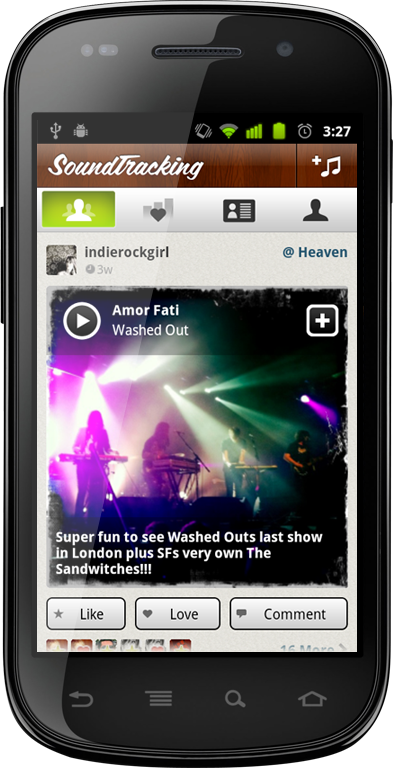
Salut a tous! Launching today at the LeWeb 2011 conference in Paris is the long-awaited SoundTracking Android app. What makes this app special is that goes above and beyond theSoundTracking iPhone app — taking full advantage of Android capabilities in order to integrate popular music services Spotify and Rdio (for users of Spotify and Rdio). Which means, yes, you can now listen to full songs on SoundTracking instead just of 30 second iTunes snippets.
Hallelujah. 
The SoundTracking app itself is visually stunning, and frictionless; Because of the back button on Android, you no longer have to manually switch between apps if you want to post or listen to a song. SoundTracking founder Steve Jang tells me that Android was his number one user request. At number two? Spotify integration.
In order to use the feature, users can hit the plus button in the app’s right hand corner for the “View in Spotify/Rdio” option. SoundTracking Android also senses when you’re listening to music in any music app from Google Music onwards and lets you send that song to SoundTracking, in another key difference from the iPhone app.
These integrations are a big step for SoundTracking, which previously only offered the streaming of 30-second song snippets through iTunes, a fact which annoyed some users (myself included). They also expand SoundTracking’s affiliate revenue capabilities beyond iTunes referrals and into affiliate fees for Rdio.
“We don’t want to decide what music consumption service they should use. We would like to be able to offer a choice,” Jang says. “If users end up liking something they discover through this collective music timeline, they should be able to have a seamless user experience to play it or add it to a playlist.”
Jang says that eventually he’ll consider adding Spotify and Rdio integration to the iPhone version of the app if users show that those features are priorities, which they inevitably will, “The key to all of this is to make it easy and fun for users to post a highly contextual music moment, but also to take what they’ve discovered and play it/playlist it/own it in their music service of choice.”
A product of Schematic Labs, SoundTracking recently announced a one million user milestone and $4.75 million in funding from Accel PartnersTrue Ventures and Softbank Capital. You can download SoundTracking for free in the Android market by searching “SoundTracking.” And watch a video of MG Siegler interviewing Jang about his grander vision for the service, below.

FlyScreen Launches An iOS 5-Like Lockscreen API For Android -

Friday, November 25, 2011 0 comments


I know, I know. Apple totally stole its new Notifications Center for iOS 5 from Android. But let’s be honest, they did a pretty good job with it. (Except for those impossibly small “X” buttons, that is.) As someone who switches between both platforms, one thing I really like about iOS 5′s Notification Center is that it’s available from the phone’s lockscreen, too. On Android, you typically have to unlock your phone in order to view your notifications.
Well, until now. Thanks to app maker FlyScreen and its brand-new “SuperFly API,” Android users may soon get their own lockscreen notifications, too.
The API is just launching today, with messaging app Kik as the first API partner. The company is also taking sign-ups from other interested app developers via a form on the SuperFly homepage. Further down the road, the API will be publicly released so all Android apps can integrate with the service through what CEO Itamar Weisbrod says is just 5 lines of code.
At first, these SuperFly notifications will be just an icon and text, as they are by default on iOS 5 and Android, but the company is working towards making them richer and more interactive in the future. When it goes live, the notifications lockscreen will be a part of the redesigned FlyScreen app for Android. FlyScreen updates, missed calls, SMS messages and email previews will be supported, too.
While the I love the idea of a better, customizable lockscreen for Android users, the challenge will be getting Android app makers to sign up. FlyScreen will need to do more than just offer a public API – it will need to actively court partnerships to make this thing a success. However, it sounds like the company is doing just that. Weisbrod says there are “more big apps to come soon” and they already have some “big ones” in testing now.
The new notifications section is already live in FlyScreen’s app in the Android Market, but Kik’s integration won’t arrive for a week or two. And as new developers sign up to use the SuperFly API, they’ll be added right away, making the app gradually more useful. If you’re interested in testing the new FlyScreen, you can grab it here from the Android Market.

Top 10 Android Apps -

Thursday, November 24, 2011 0 comments

Android's been around for more than a year, and in that time developers have whipped up some great apps. Whether you're a new Android owner or a pro looking for new tools, these 10 great and free apps belong in your arsenal.
Photo by lwallenstein.
We're going to skip right over the apps that are just so common, universal, and well replicated on the iPhone or other mobile platforms that a user with a need will probably hunt them down—Facebook, Yelp, Evernote, Remember the Milk, and endless Twitter clients, widgets, and apps. We've also skipped over Google's own neat apps, like Google Voice, Navigation, and Goggles, that are (or will be) included standard on new Android phones. Instead, we're aiming to shine a little light on apps that quietly offer excellent functionality for those who download them.
Update: I moved TasKiller Free up to a lower ranking, and modified its entry description a bit, after some further research, spurred by some Andro-savvy comments and emails.

10. Layar

In some ways, this is a vote for the potential of Layar as much as the practical application. Walking around with your phone and seeing Wikipedia subjects, apartments for sale, and what Twitter users have raved about through your phone is a pretty neat thing, and potentially helpful when you're looking for things to do in a new city. But as Layar continues to add new layers, and as camera and mobile processing power continue to improve, Layar could become a lot more interesting than it already is. One thing worth mentioning is that if you don't like the 3-D camera view, or like the looks of yourself while using it, Layar can just show you points of interest on a Google-type map. Either way you use it, it's an intriguing look at what's happening just around the corner. 

9. Listen

Until the latest upgrade, we couldn't have really called Listen a king among podcast apps—it had a few irksome bugs, one of them being the loss of episodes and, sometimes, subscriptions. Now, however, Google's own app does a great job not only of finding audio content, but it exports your subscriptions to be managed in Google Reader, ensuring a full feed backup and easier retrieval of past episodes you want to head back and hear. If you need more fine-grained podcast control, try ACast, but Listen will work for most. 

8. AnyCut

You can drop a lot of neat things on your Android home screen, but you can't quite get one-click access to everything in your phone's settings and extras. AnyCut doesn't have a great interface, and it might take some trial and error before you get to exactly what you're looking for. Soon enough, though, you'll have access to the deepest guts of your settings, so switching 3G on and off, enabling location services, and other tricks are easy to pull off. 

7. Secrets

There's no browser syncing on the Android—yet (c'mon, Mozilla, get on that Firefox Mobile!). In the meantime, there's Secrets, a secure, KeePass-compatible, master-password-locked vault for all your passwords. It's not that hard to export your passwords from your desktop or laptop onto your SD card, and with full-text search finally implemented, Secrets is a lot more convenient for those oh-shoot-what's-that-username-again moments. 

6. TasKiller Free

The downside to Android's multi-tasking is that sometimes, some apps can become unexpectedly become memory or bandwidth hogs, or bring your phone down with them when they crash. Few apps provide a direct, easy "Quit" option, though, and sometimes you can't get to the app to close it. Enter TasKiller, a free app-killing utility that works from its standard icon, or as one of a number of widgets you can add to your home screen for one-click system rescuing. The free version serves up ads and lacks a few advanced features, but generally serves the needs of anyone who's sick of needing to actually reset their phone just to clear up space for, you know, phone calls and such. Note: This app should be used as more of a last resort than regular maintenance tool—killing processes and apps willy-nilly can turn off alarms, kill background syncing, and have other unintended consequences.

5. SlideScreen

You use your Android smartphone differently than your desktop computer. You don't work with files and shortcuts, so much as you check in on the streams of data you care about—email, text messages, Facebook and Twitter, chat, and the like. SlideScreen replaces, or just augments, if you'd like, your phone's home screen, creating row after row of messages and feeds. Slide the center info bar up and down to look at more or less of your items, swipe to the right to dismiss items as read, and revel in having all your data on hand at once. SlideScreen also replaces the standard application tray, giving you 8 slots to put your most frequently accessed apps, and tucking all the others into a rolling deck below. It's a total makeover for your phone, in other words—one that might just make you fall in love all over again with the concept of mobile data. 

4. Shopper

Okay, at first we were pretty skeptical of Google's Shopper app, since it seemed like just a mashup of Google's own Goggles and barcode-smart apps likes ShopSavvy. Then we actually used Shopper, and were amazed at both how accurately it picked up both barcodes and simple cover shots, and at how very fast it worked. Turns out, according to one developer who appeared on This Week in Google, Shopper is actually uploading image data to Google's servers as it captures it, and decodes barcodes right on the phone. Speed for speed's sake is nice, sure, but it's pretty nice not to have to stand in front of a book display for a whole two minutes, waving your phone around a bunch of books you're trying to competitively price. Shopper answers the "Can I buy this cheaper" question, and answers it quickly.

3. PDANet

PDANet is the easiest way to use your phone's cellular net connection as a makeshift internet access point, for those hard-up situations when you just need to get online somehow, anyhow. The free version always offers basic internet access, but restricts secure site connections after a trial period. The paid version isn't cheap ($30), but it is the easiest of the three ways we know how to tether an Android phone. For the cost of nothing, we'll take some basic web site browsing—because, hey, can't you get to Gmail on your phone if you really need it? 

2. WaveSecure

This one's only free until March 31, so be sure to jump on it if you think there's even a remote chance you'll want some killer security tools available to you. WaveSecure not only backs up your contacts, SMS messages, photos and videos, and other files to the developer's cloud for later restoring if your phone gets lost, but can lock down a phone when you're stashing it for a while, locate a phone with GPS or text message triangulation (seriously), and, as a final option, pull off a total and complete remote wipe if you fear all is lost. Powerful peace of mind, especially for the price. 

1. ASTRO File Manager

This is one of those apps you hope gets some attention, if only to be bought by Google or otherwise integrated into the basic phone software. ASTRO File Manager does a great job of letting you navigate files on your SD card and accessible internal memory, sure, but it also has its own built-in task killer, backs up applications, can send files as email attachments (not all that easy or intuitive from the mail client, for some reason), and much more. It's the Leatherman of Android utilities, and a must-have on any serious geek's phone.


To each their own, of course, but we'd love to hear what Android apps you consider crucial to your own phone in the comments. We tend toward free, but if you've found a cheap app that's worth a few bucks, our Android-loving readers, and developers, would likely be glad for the referral.

 
CrackleTech © 2011 | Designed by WetCanvas Inc.